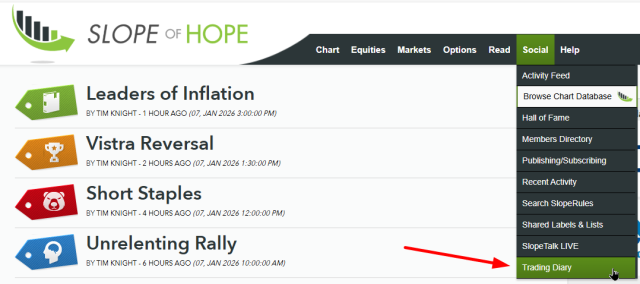
The Trader’s Diary is a helpful feature that allows you to share your thoughts about your own trading at the end of the day. This is not only a valuable tool for you to clear your mind about the day’s events but also helps serve as a future reference so you can reflect upon your own trading and focus on what you’re doing well and where you can improve. You can access this feature on the Social menu:
This is an intentionally simple diary, and it must be stressed, it is private. We do plan to allow you to share your diary with others in the near future, but there is already a part of the form “Private Note” which will not be shared even if you elect to let others see your diary in general.
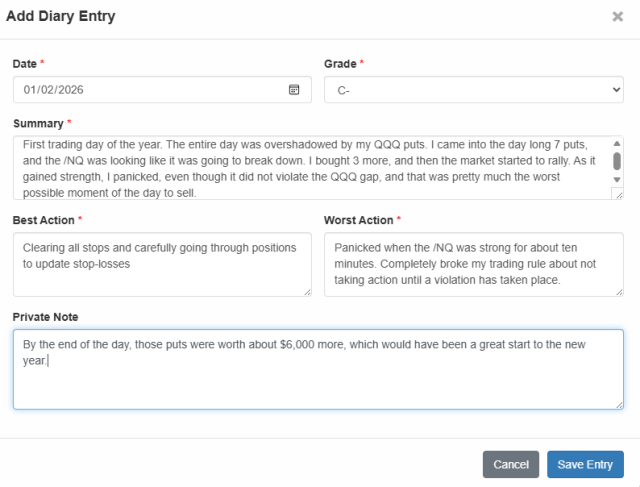
The form is fairly self-explanatory, but just to review:
- Date: this defaults to today’s date, since it is assumed you’ll want to enter your thoughts when they are nice and fresh (we will be introducing an optional reminder email to prompt you after the close each day to make your diary entry); you can click the date picker to choose any date you like
- Grade: this is the grade you give yourself for your performance. It doesn’t necessarily relate to profits and losses. You may lose money but give yourself an “A” because you executed really well and managed your emotions, and likewise you may make big profits but give yourself a poor grade if you messed up somehow. It’s just a quick-take on how you view your own behavior.
- Best Action: what are you most proud about doing during the day?
- Worst Action: what do you regret or wish you had done differently?
- Private Note: this is optional, and it’s just a place where you can enter something that you don’t want anyone to see, even if you ultimately make your diary public (e.g. “Blew my entire account that I had created to buy Tim some decent clothes.”)
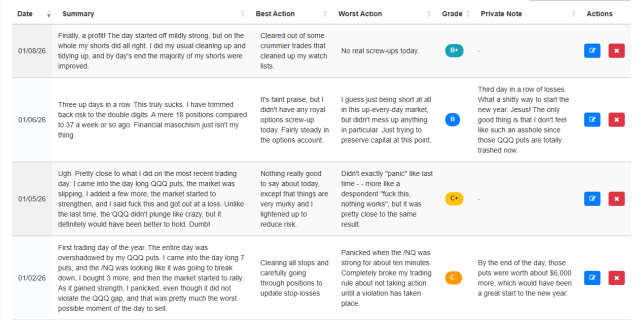
All of your entries will be shown to you, spreadsheet style, and can be sorted by any column (the default sort is by date in reverse chronological order, meaning your most recent entry is at the top). You can also show the entries that have any particular word, phrase, or ticker symbol by typing inside the Search box near the top of the page.
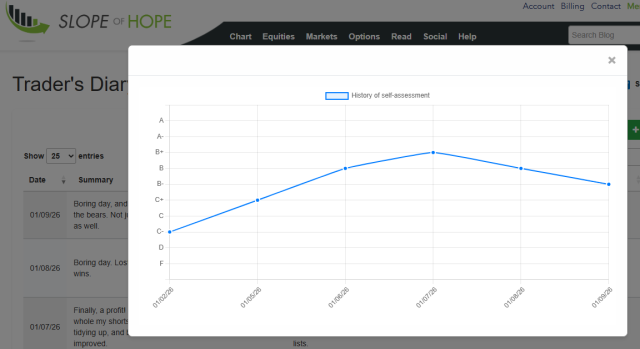
You can also click the graph icon at the top of the page to get a historical perspective of all the grades you have given yourself.