Slope of Hope Blog Posts

Slope initially began as a blog, so this is where most of the website’s content resides. Here we have tens of thousands of posts dating back over a decade. These are listed in reverse chronological order. Click on any category icon below to see posts tagged with that particular subject, or click on a word in the category cloud on the right side of the screen for more specific choices.

Synch or Swim

By -

Well, we’ve just added an improvement which is really un-sexy, but slick nonetheless: synchronized watch lists. This is along the same line as the recent Broadcasting Objects improvement, because what it does is makes sure any changes to watch lists stay in synch on whatever browsers, tabs, or computers you might be using. I realize this is a bit of an ‘edge’ case, but for those of you for whom this is relevant, this is a godsend.

Custom Tool Palette!

By -

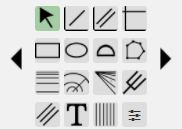
Those of you who use SlopeCharts are familiar with the tool palette in the lower-left corner, which provides direcetly access to sixteen different drawing objects:

fullpalette

There are two problems with this: one, it doesn’t have enough room to fit all our current tools, and two, it dissuades me from adding more drawing tools since we’re already out of room! We have solved both of these problems, and the solution is found with the icon in the lower-right of the tool palette, which is the new Customize function.

(more…)

Multiple Portfolios!

By -

Yes, it’s yet another improvement to our CryptoStream product, and it’s one I’ve been nagging about for a long time: the ability to have multiple portfolios.

Now, the reason this may be of interest to you might be that you have different portfolios at different brokerages. That isn’t why I was so eager for it. My reason was sort of a twist on the whole “woulda shoulda coulda” theme. I wanted to be able to preserve my portfolios when I closed them so I could look back and see what the profits or losses would have been had I simply hung on to them.

Whatever your reason for wanting multiple portfolios, it is all controlled via these three self-explanatory buttons, which all you to create a New portfolio, Rename an existing portfolio, or Delete the currently-selected portfolio.

threebutons
(more…)