

I have another cool new feature in SlopeCharts to announce: Attached Studies. What on Earth is that? Well, let me tell you! What we’ve done here – – and I don’t know if I’ve seen this elsewhere, so let me know if I’m wrong – – is created a way for you to associate any study set with a specific symbol.
As you probably know, normally when you have technical studies “active”, they apply to every single symbol you examine. That’s the way it is on any website or any charting program. You choose the studies, and then you start going through your symbols, all of which will be enhanced by the studies.
There are some instances, though, when you don’t want that. perhaps there is one particular set of studies which you always want to see just for the Dow Jones Industrial Average, and nothing else. Using this new feature, you can “attach” that specific study set specifically to the $INDU (or whatever the symbol might be) so that it reliably appears for that symbol and no other. In other words, you won’t have the nuisance (or have to remember) to apply that specific study when you look at that particular symbol.
To use this feature, just right-click on the chart of the symbol you want to “attach’ to a study set, and select Attach Study Set. Specifically, choose the study set you’d like to associate with this particular symbol.
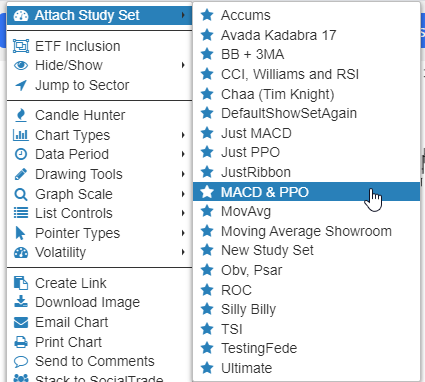
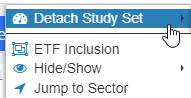
As always, you can hit Ctrl-S to toggle studies on or off (in case you want to temporary hide the study when looking at the symbol in question). If you want to eliminate the attachment altogether, just right-click the chart again while looking at that specific symbol and choose Detach Study Set.
That’s all there is to it! I hope you enjoy and benefit from this new feature.
