

It was only yesterday that we introduced Chart-Based Alerts to the SlopeCharts feature set. We are pleased to follow this up with something vastly more complex on our end, which is trendline-based alerts.
Let’s take a real-life example of an ETF I follow, which is the Brazil ETF, symbol EWZ. There is nothing particularly tradeable about this chart, but I believe a break above the horizontal line would be bullish and a break below the ascending trendline would be bearish.

You already know how to set up the horizontal line alert. To set up an alert for the trendline, you would right-click on the line and see a menu item called Create Chart Alert.
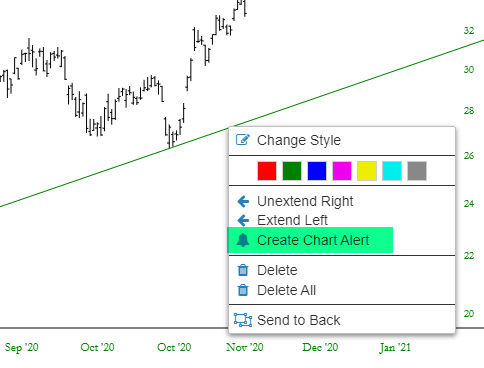
This presents you with a dialog box. The symbol is already filled out, as is the trendline rule. The only thing you need to selection is a Condition. In this case, we would choose “crosses below”, since we want to be alerted if the price ever crosses below the selected trendline.

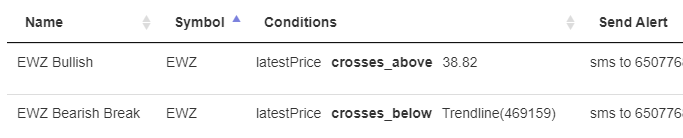
Thus, we have set up two important alerts for this one symbol: a bullish alert (based on the horizontal) and a bearish alert (based on the trendline). This succinctly illustrates how helpful chart-based alerts are, since otherwise you would have to constantly check that chart to see if the price had crossed either line, which would of course but a ridiculous waste of time and highly prone to missing opportunities.
We will be adding more bells and whistles to Chart-Based Alerts. Please make good use of this, and I look forward to hearing your feedback in the weeks ahead.
