

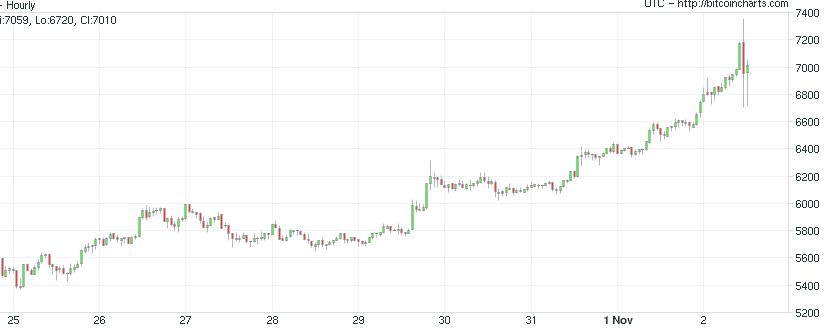
Bitcoin continues to set the world on fire, blasting through $7,000 last night (let’s all remember this critter went “public” at one penny in 2009):

Slope initially began as a blog, so this is where most of the website’s content resides. Here we have tens of thousands of posts dating back over a decade. These are listed in reverse chronological order. Click on any category icon below to see posts tagged with that particular subject, or click on a word in the category cloud on the right side of the screen for more specific choices.
Bitcoin continues to set the world on fire, blasting through $7,000 last night (let’s all remember this critter went “public” at one penny in 2009):
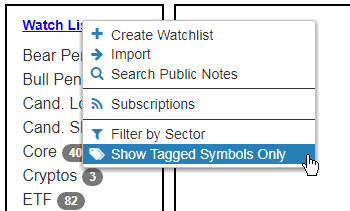
Besides the improvements in SlopeCharts mentioned on Sunday, I had another one for you – – the ability to display only tagged symbols in watch lists. (SlopeCharts link is here).
Tagging is a basic feature in watch lists, allowing you to highlight specific symbols that, for instance, you want to keep a close eye on. A “tag” icon appears next to any tagged symbols. But what if you want to see only those, and not even bother viewing the rest? Here’s how to do it: make thei choice from the Watch Lists menu:
SlopeCharts has a couple of new features I wanted you to know about.
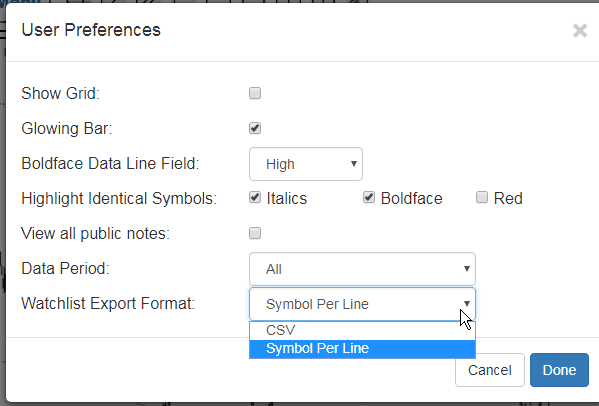
First of all, I’ve received some requests to allow for the exporting of symbols from a watchlist into a comma-delimited format (as opposed to just a row of individual symbols in a text file). You can now export comma-delimited files by changing this setting in User Preferences: